

Server hosting website design vyrex.co
How we made the hosting site vyrex.co: main page, VPS directory with filters, dedicated servers, mobile version and UI kit
About the client and task
vyrex.co sells virtual and dedicated servers in Europe. VPS operate on two platforms: AMD Ryzen 5 3600 and AMD Ryzen 9 9950X with a port of up to 10 Gbps. Dedicated servers are rented out entirely, with different amounts of memory and disks.
Such a product has many parameters: location, processor, number of cores, memory, disk, channel speed, price. If you dump everything at once, the site turns into a price list, and the person goes to ask for support or goes to a competitor with a more understandable showcase.
The task was formulated as follows:
show the cost and two types of servers at once, on the first screen;
give filters that are convenient to use with both the mouse and finger;
make tariffs easily comparable with each other;
assemble everything on one system of components so that the site can be developed without reworking from scratch.
In terms of style, the client wanted a signature blue, soft glows in the blocks and volumetric 3D elements. At the same time, the site should not resemble any of the large cloud services that hosting companies usually compare to.
Where we started: server selection scenario
Before drawing the screens, we painted the buyer's path. A person comes with two questions: “how much does it cost” and “is there the configuration I need.” The first site should respond in a second, the second - in a couple of minutes of working with filters.
From this the site structure grew:
Home - a showcase with prices and short lists of tariffs for those who already know what they want.
Virtual server catalog - selection by parameters for those who compare.
Dedicated servers catalog - the same logic, but with a different set characteristics.
Configurator - for those who are not suitable for any ready-made tariff.
All pages are made in two versions, for computer and phone. Common blocks like the list of data centers, FAQ and footer move from page to page without changes, so the site feels seamless.
Home page: price on the first screen
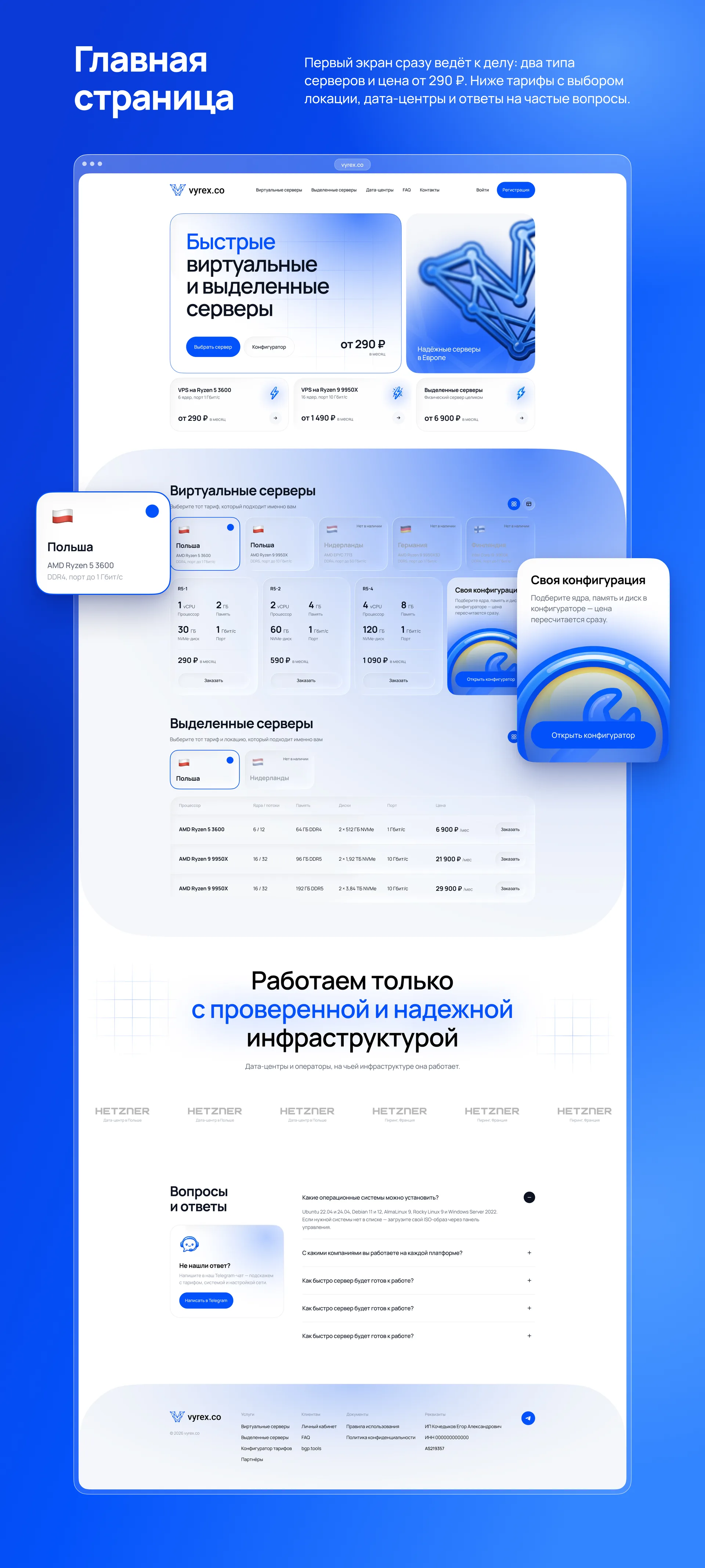
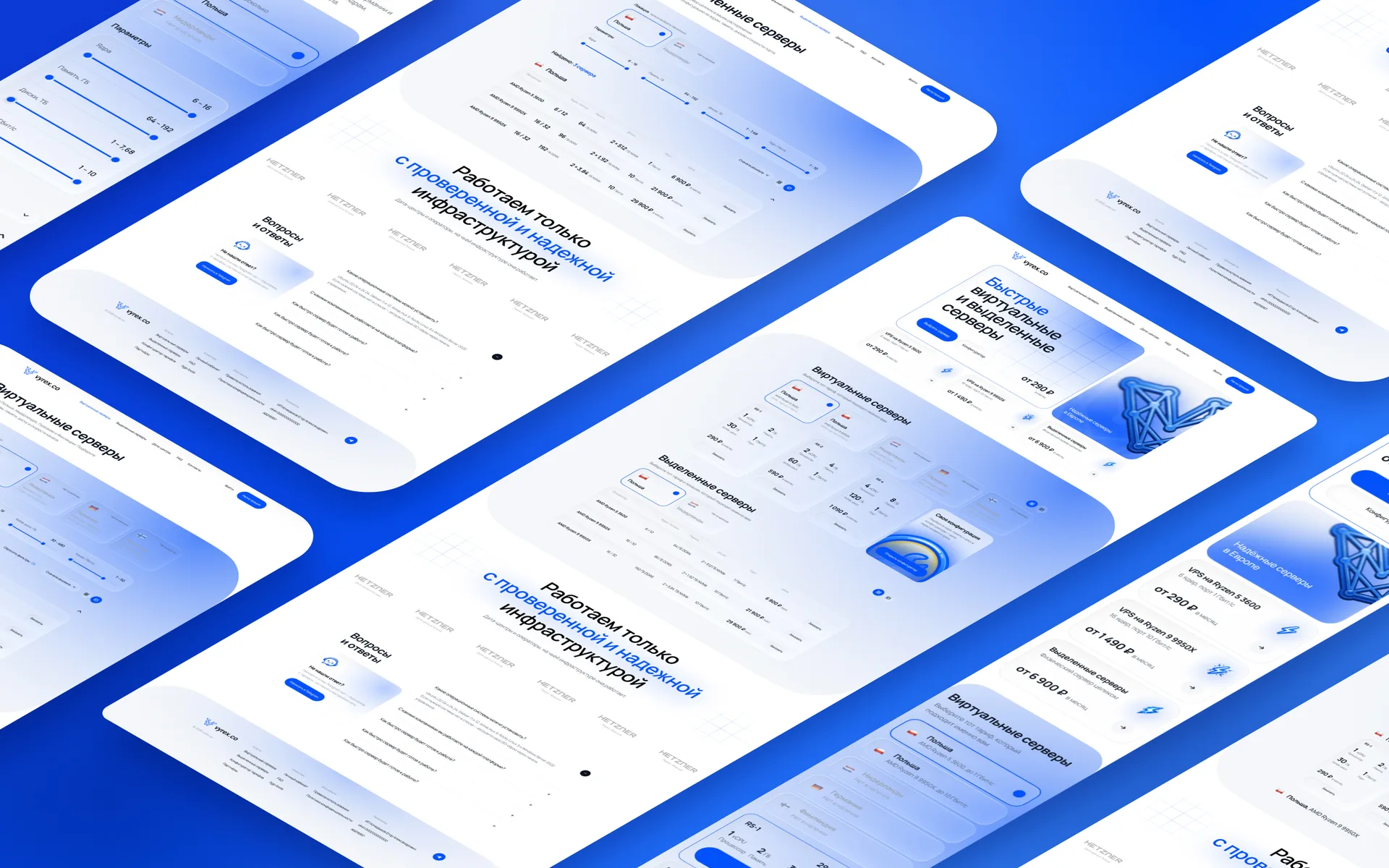
The first screen answers the main question right away: the title “Fast virtual and dedicated servers” and the price from 290 ₽ per month. There are two buttons nearby: “Select server” leads to tariffs, “Configurator” leads to assembling your configuration.
Under the main block there are three cards with prices by area:
VPS on Ryzen 5 3600 - from 290 ₽ in month;
VPS on Ryzen 9 9950X with a 10 Gbps port - from 1,490 ₽;
entire dedicated server - from 6,900 ₽.
This three directory entries. A person who already knows his task goes to the desired section in one click. To the right of the header is a three-dimensional 3D illustration of the network in corporate blue and the caption “Reliable servers in Europe.”
Tariffs with choice of location
Below are two blocks of tariffs: virtual and dedicated servers. In each, the location is first selected, then the tariff. This way, a person does not see offers that are not suitable for him by geography.
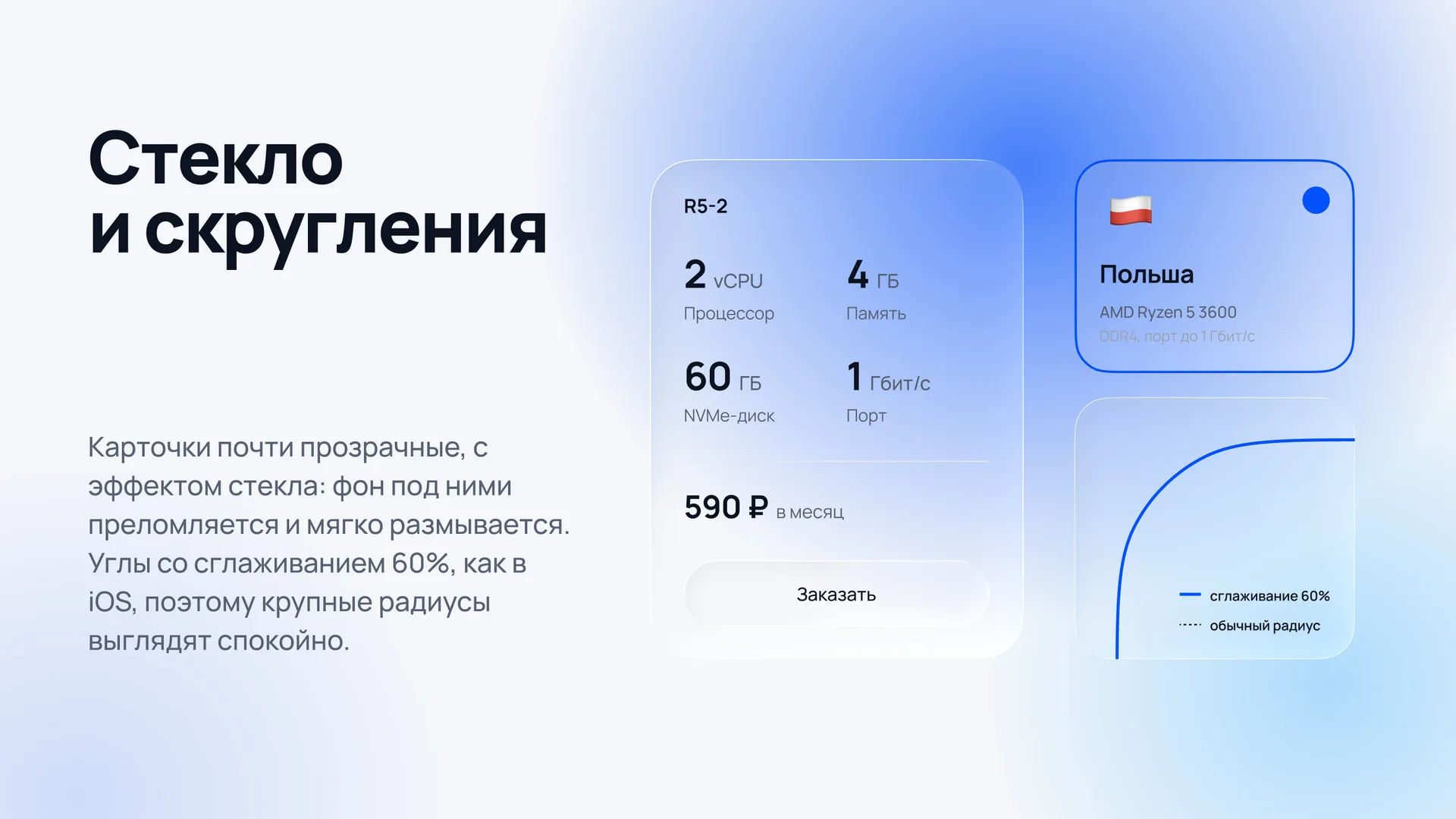
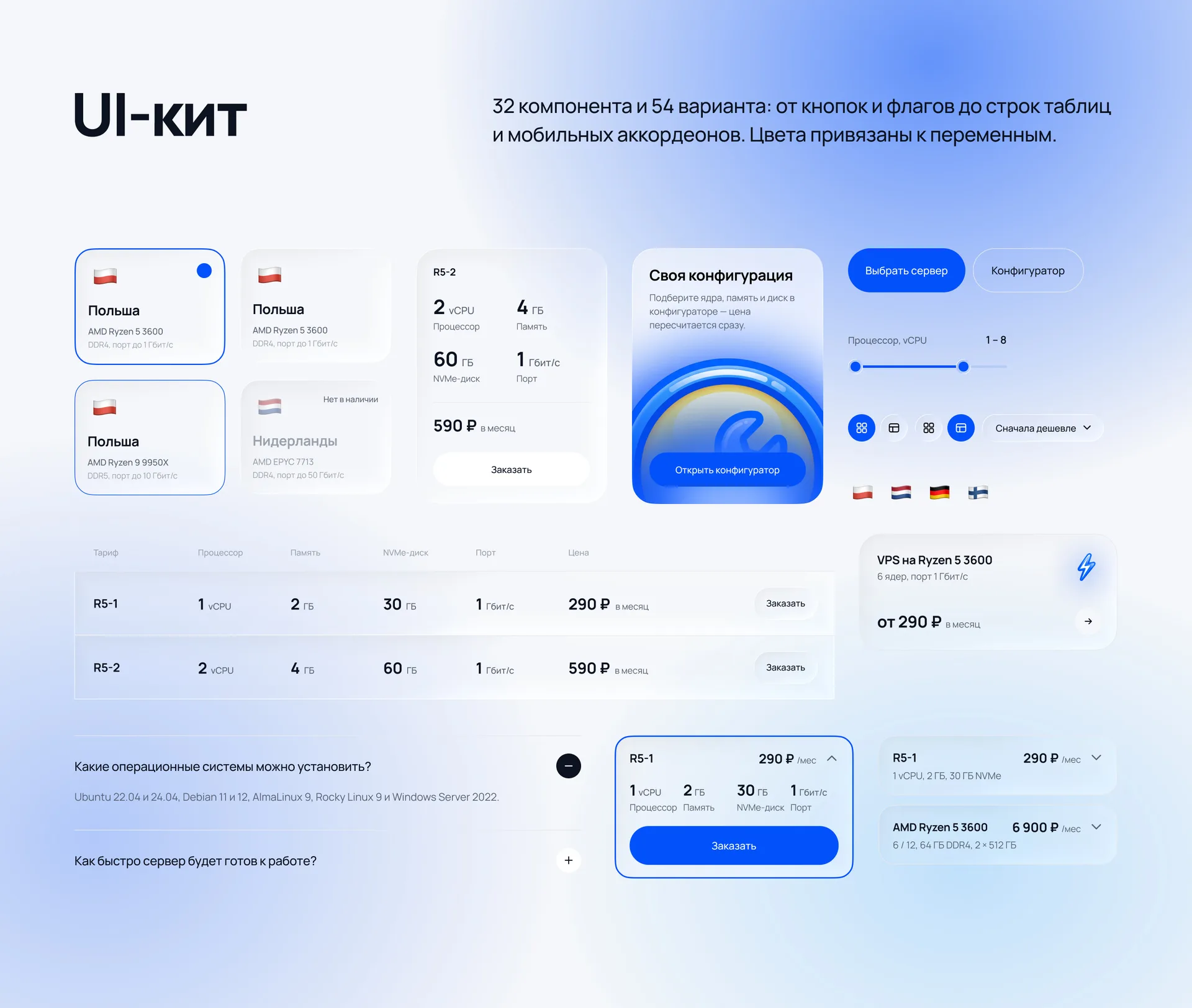
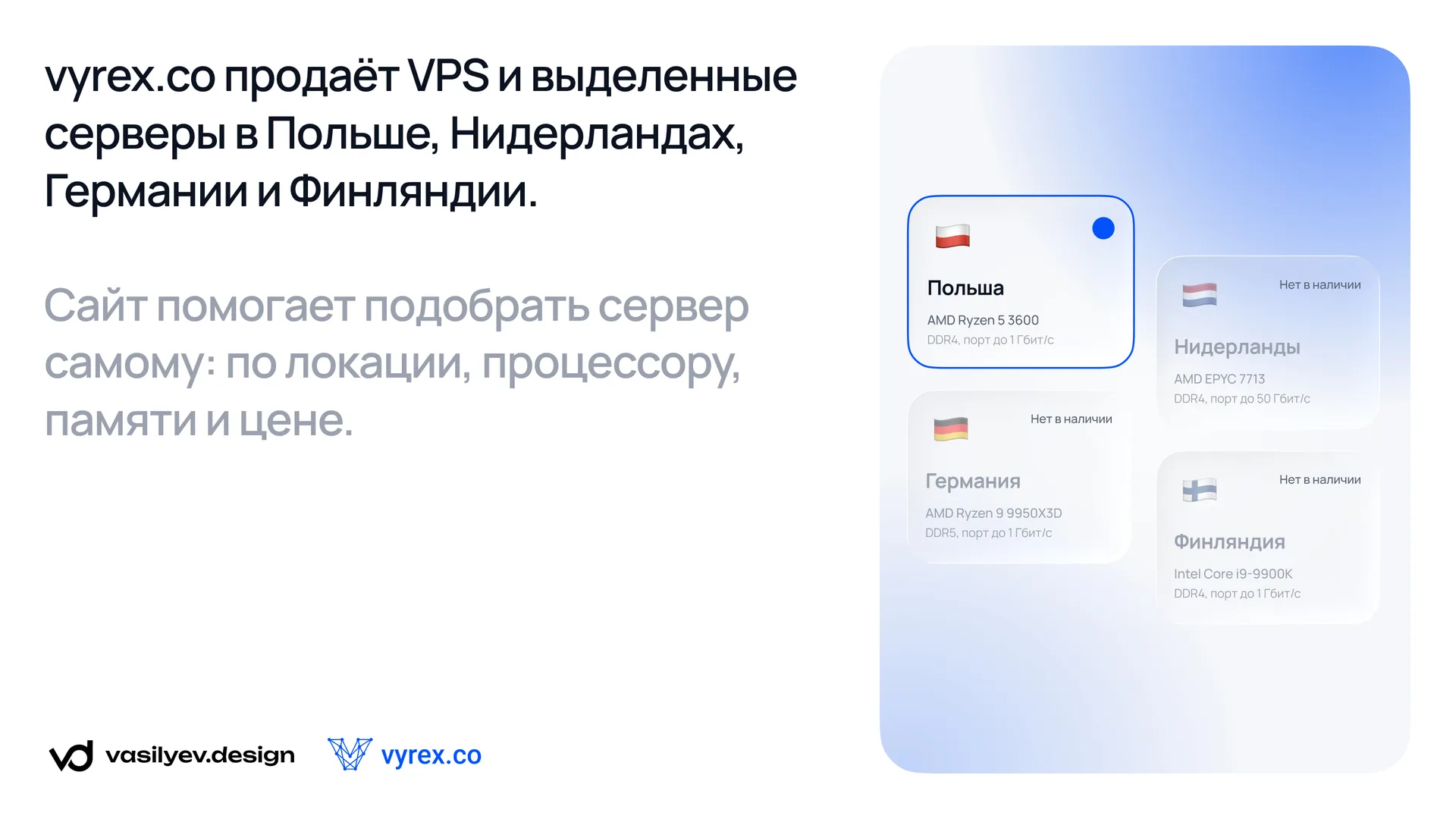
The location card shows the flag, country, processor and port speed. It has four states: selected, normal, under the cursor and “out of stock”. The last state is important for hosting: it is better to honestly show that the location is temporarily occupied than to hide it and force a person to look for it.
VPS tariffs are shown as cards with four numbers: processor, memory, NVMe disk and port. The numbers are large, the units of measurement are small and gray, so tariffs are compared simply at a glance. The last card in the row is “Custom configuration”, it leads to the configurator, where the price is recalculated immediately.
Dedicated servers have more characteristics, so we immediately put a table there. More about it below.
Data centers and frequently asked questions
The “We work only with proven and reliable infrastructure” block shows the logos of data centers and operators with the signature of the country. For hosting, this is the main argument of trust: people want to know where their server is physically located.
In the FAQ block, questions are revealed by clicking, and on the left there is a card “Didn’t find the answer?” with a link to Telegram chat. An unanswered question should not be a dead end.
VPS directory: all filters in one panel
The virtual server directory is the central page of the site, where a person makes a decision. We worked on it the longest and redid the filters several times.
Location
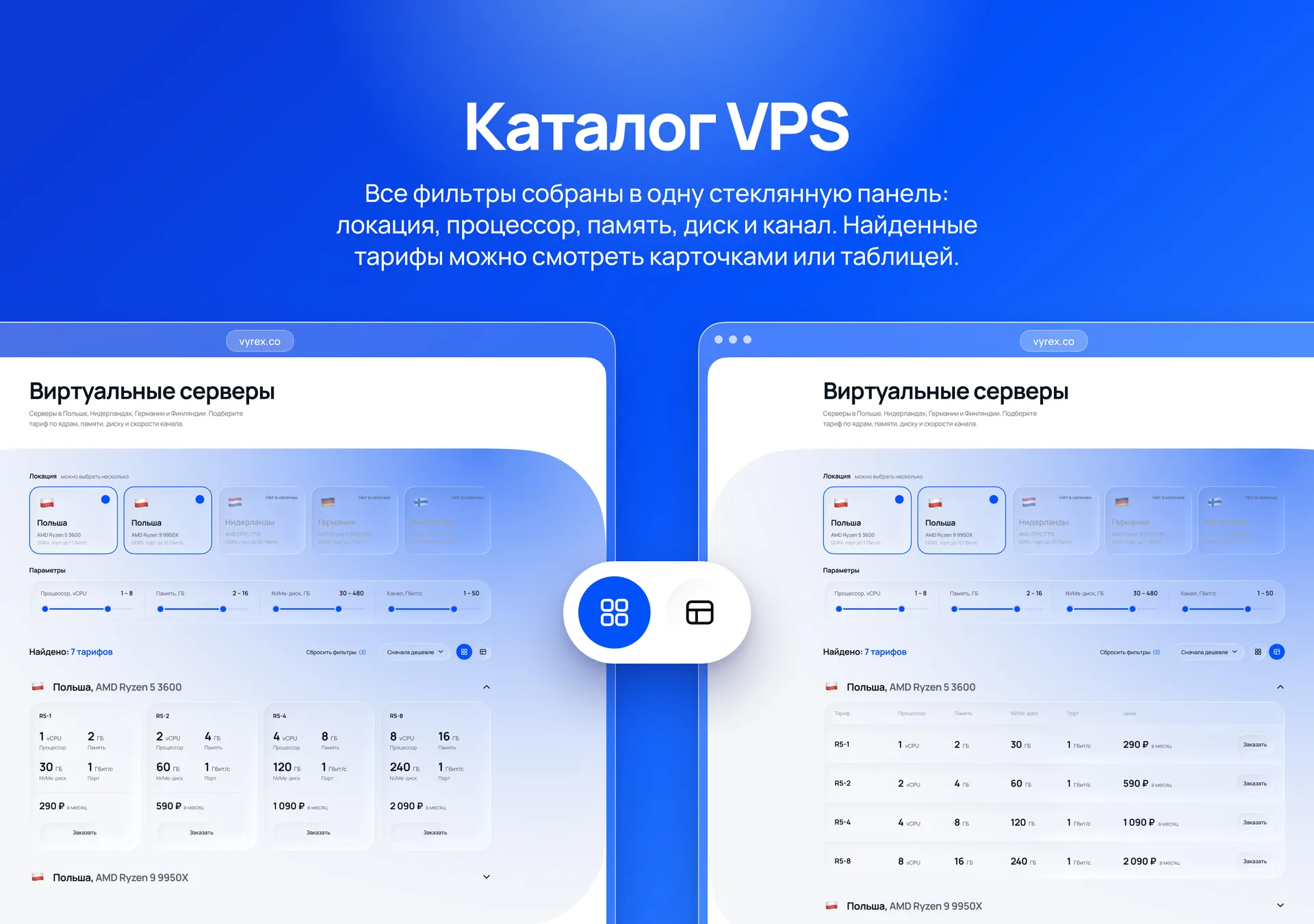
At the top of the page there is a row of location cards, and you can select several at once. The card shows not only the country, but also the platform: for example, in Poland there is an AMD Ryzen 5 3600 with DDR4 and an AMD Ryzen 9 9950X with DDR5 and a port of up to 10 Gbps. For the technical audience, the processor is no less important than the country.
Parameters
Under the locations there are four range sliders:
processor from 1 to 8 vCPU;
memory from 2 to 16 GB;
NVMe disk from 30 to 480 GB;
channel from 1 to 50 Gbit/s, in steps of 1; 2.5; 10 and 50 Gbit/s.
The first version of the filters looked impressive: non-standard sliders, each in its own tile. But they were inconvenient to pull, especially on the touchpad, and we abandoned them. We brought back the usual sliders with two handles and designed them in the style of the site: a blue path, white handles with a blue core and a soft shadow.
The second edit concerned the layout. Four separate slider cards split up the screen, so we combined them into one glass panel with thin dividers. Filters now read as one tool, rather than as four different blocks. Above each slider on the right is the selected range, for example “2 – 16”.
Results: cards or table
Above the results is the line “Found: 7 tariffs”. To the right of it is a “Reset filters” link with a counter of active filters, a “Cheaper first” sorting and a view switch. The counter is needed so that a person understands why there are few tariffs, and can return to the full list with one click.
Tariffs are grouped by platform: “Poland, AMD Ryzen 5 3600”, “Poland, AMD Ryzen 9 9950X”. Each group can be collapsed if it is not interesting.
Initially, the tariffs were only cards, as on the main one. Then it became clear that it was more convenient for technical specialists to compare strings. We have added a table view where the names of the characteristics are placed in the header: the words “Processor” and “Memory” are not repeated in each line. The cards remain for those who choose with their eyes, and the switch allows you to choose a convenient option.
In the VPS table, the columns are as follows: tariff, processor, memory, NVMe disk, port, price and the “Order” button. For example, the R5-1 tariff is 1 vCPU, 2 GB of memory, 30 GB NVMe and a 1 Gbps port for 290 ₽ per month. The older R5-8 gives 8 vCPU, 16 GB and 240 GB for 2,090 ₽.
Dedicated servers directory: same logic, different table
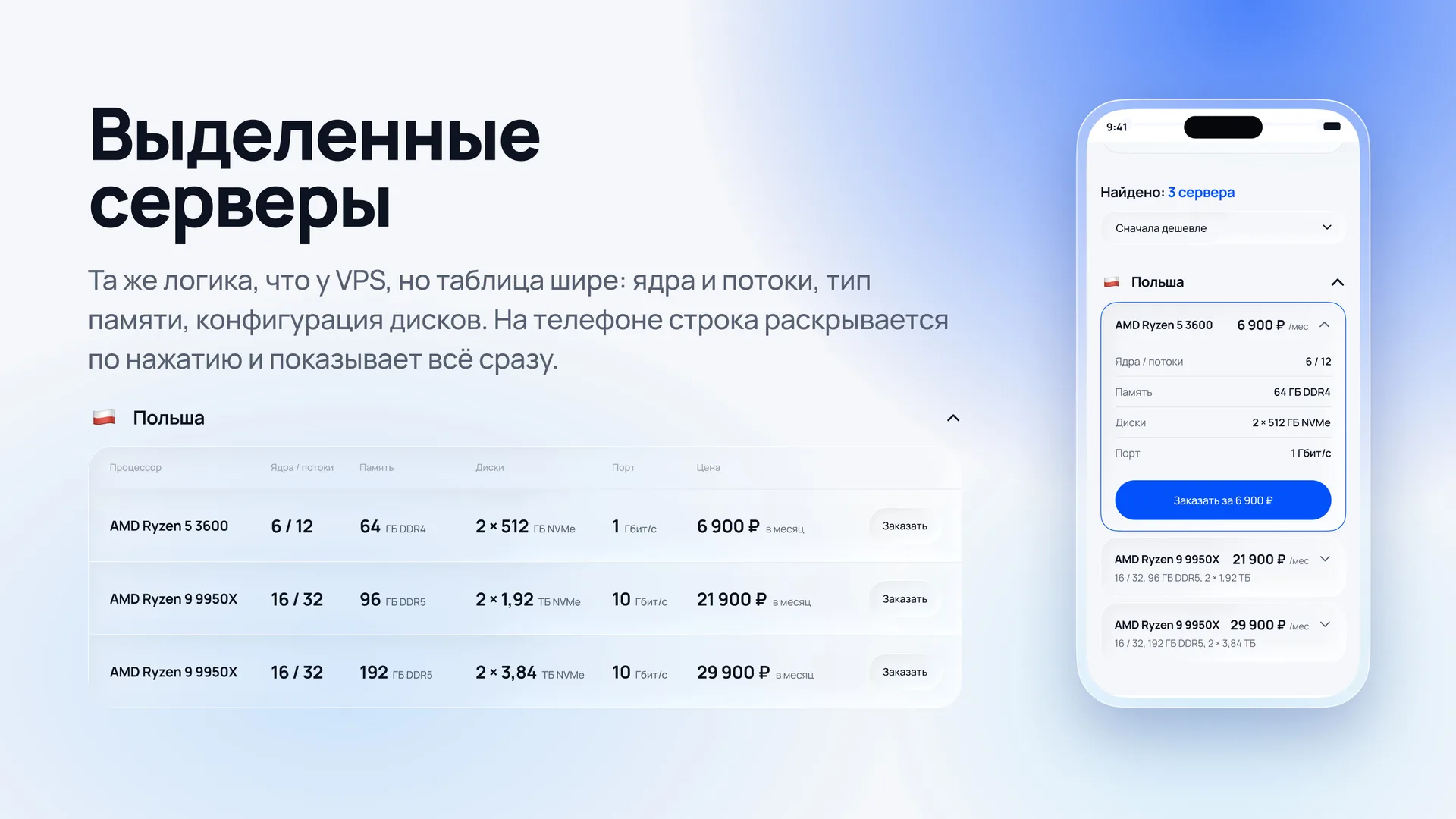
The dedicated servers page repeats the structure of the VPS directory: location, parameters, results. A person who has already understood one section will not have to learn again.
The set of characteristics is different. For a dedicated server, physical cores and threads, memory type and disk configuration are important, so the filters here are as follows:
cores from 6 to 16;
memory from 64 to 192 GB;
disks from 1 to 7.68 TB;
port from 1 to 10 Gbps.
The table is wider than that of VPS. It contains columns “Processor”, “Cores/Threads”, “Memory”, “Disks”, “Port” and “Price”. One line looks like this: AMD Ryzen 9 9950X, 16 / 32, 96 GB DDR5, 2 × 1.92 TB NVMe, 10 Gbps, 21,900 ₽ per month.
The numbers are typed large and bold, and the units and types are in small gray font: “96” and "GB DDR5". It turns out to scan the table by column and immediately see the difference between the servers.
Mobile version: lists instead of sliders
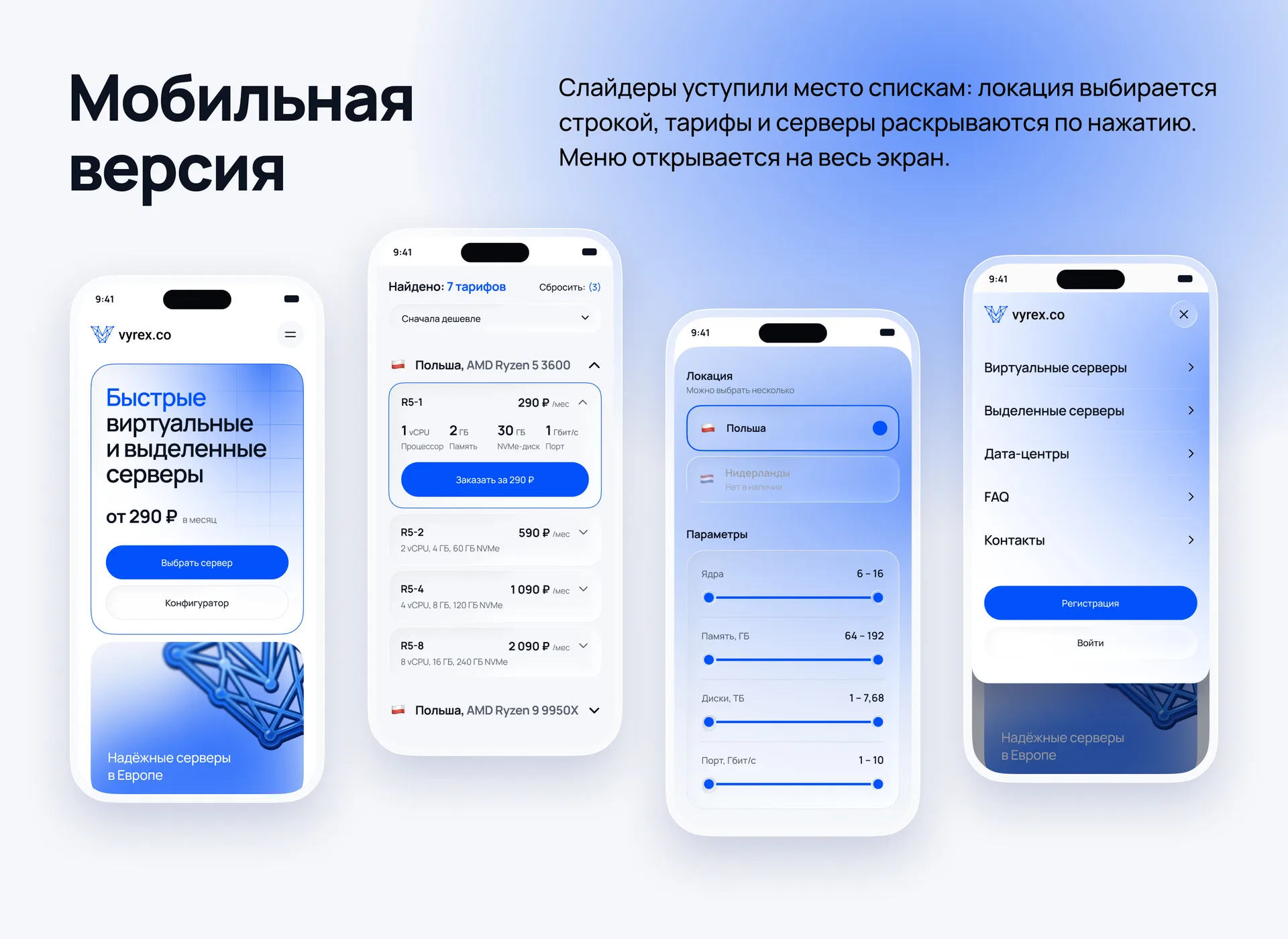
In the mobile version, we didn’t just compress the desktop, but redid those blocks that are inconvenient to work with on the phone. The layouts are made with a width of 390 px.
Tariffs and servers are revealed by clicking
The most obvious option is a horizontal slider from tariff cards. We abandoned it: one tariff is visible in the slider, and it is almost impossible to compare them with each other.
To select, we collected several options on one frame and settled on drop-down lines. In the collapsed line you can see the name, price and a short summary: “R5-2, 590 ₽/month, 2 vCPU, 4 GB, 60 GB NVMe.” When clicked, the line opens, shows the characteristics and the “Order for 290 ₽” button.
This way, the entire line of tariffs is displayed on one screen, and prices can be compared at once. We applied the same principle to dedicated servers: when collapsed, the line shows “16 / 32.96 GB DDR5, 2 × 1.92 TB.”
Locations in a list
On a desktop, locations are side by side with cards, but on a phone such a row would have to be flipped sideways. We made them into a vertical list of strings: flag, country, processor and selection mark on the right. The inaccessible location remains in the list, but dims and receives the signature “Out of stock.”
Parameter filters are arranged in a column, each spanning the entire width of the screen. The wide slider is convenient to pull with your finger, and the sorting is revealed in a separate list.
Full screen menu
The burger button opens a menu with sections: virtual servers, dedicated servers, data centers, FAQ and contacts. Each item is a large line with an arrow, easy to hit with your finger. At the bottom of the menu there are two buttons: “Registration” and “Login”, so that the client does not have to look for an entrance to the panel.
Font and palette
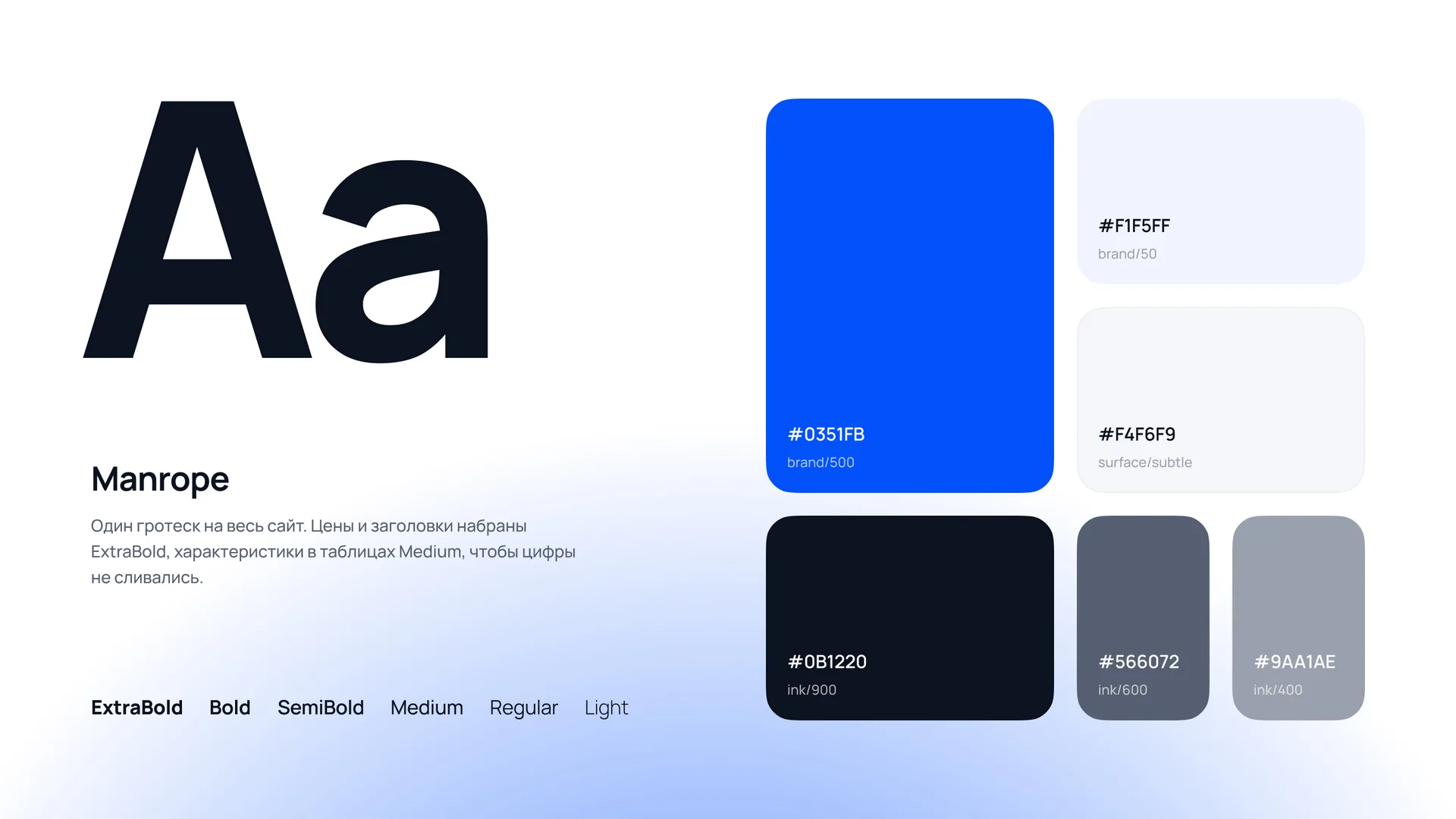
There is one font for the entire site - Manrope. Prices and headings are typed in ExtraBold, characteristics are in Medium tables so that the numbers do not merge even in small signatures. Manrope has open forms of characters, the numbers are easy to read, and for a site with tariffs this is the main thing.
What to consider when ordering a hosting site design
Based on the experience of this project, we have collected seven rules that are suitable for any hosting, VPN service or SaaS with tariffs.
Show the price immediately. The phrase “from 290 ₽ per month” on the first screen works better than any slogan. The person understands that he can afford the offer, and reads further.
Make filters familiar. A non-standard slider looks interesting in the layout, but is annoying in operation. The usual control, designed in the style of the brand, is almost always better.
Give two types of output. Cards are convenient for those who choose with their eyes, a table - for those who compare numbers. The switch is cheap, but becomes convenient for both audiences.
Don't hide what is not available. A occupied location with a mark shows that the service is live and will be replenished soon. An empty space in its place looks worse.
Design the mobile version separately. The card slider seems logical, but makes it difficult to compare. Drop-down rows put the entire line on one screen.
Show the infrastructure. Data centers, processors and port speed are the arguments that a technical buyer looks for first.
Order a UI kit along with layouts. Hosting tariffs and locations change constantly. With the whale it's a routine, without it there are hundreds of manual edits throughout the site.
Frequently asked questions
How long does it take to design a hosting website?
We make a turnkey website from two weeks. The exact period depends on the number of pages, whether catalogs with filters, a mobile version and a UI kit are needed.
How much does website design cost for a hosting provider?
The cost is calculated after the brief: it depends on the volume of pages and states. For reference, you can take this case: the main one, two catalogues, a mobile version and a kit.
Do you do only the design or the entire website?
We can do both. The studio makes turnkey websites: design, development, hosting setup and further support. If you have your own developers, we will transfer the layouts and UI kit to Figma.
In what form are the layouts transferred?
In Figma: pages for desktop and phone, components with all states and colors in variables. The developer sees the indents, sizes and colors directly in the file.
Is this approach suitable for VPN or SaaS?
Yes. Any service with tariffs and parameters needs the same thing: a clear price, a convenient comparison and a quick path to payment.
Let's discuss your project
If you have hosting, VPN or other IT service with tariffs and the site does not help you sell, write to us. We will analyze the current site, propose a structure and name the deadlines.